Templates - reusable search logic
Templates in JCM Search are reusable building blocks that help identify structured types of sensitive information, such as credit card numbers, personal names, or bank account details.
Unlike simple keyword matching, Templates combine pattern recognition (via Regular Expressions) with context keywords, enabling more accurate and consistent detection across different file formats.
How Templates Work
Each Template contains two components:
- A Regular Expression (RegExp) that defines the structural pattern for the data
- Mandatory or optional keywords that provide context to reduce false positives
This combination allows Templates to detect information even when:
- the exact value is unknown
- formatting varies
- the data is mixed within long text documents
Templates provide a reliable way to find information required for audits, compliance, security assessments, or forensic analysis.
Built-in Templates
JCM includes a collection of predefined Templates designed to detect the most common categories of sensitive information. Each template below includes its technical matching rules in a dedicated block for quick reference.
Credit Card Number
Detects widely used formats of credit card numbers, including contiguous digit sequences and segmented patterns.
Matches when:
- A sequence of 13–19 digits, or
- A 16-digit sequence in format 4-4-4-4 (digits or dashes/spaces), or
- A 15-digit sequence in format 4-6-5
Optional keywords:
card, number, pan, primary account number, card identification, bancard, visa, mc, amex, am, account, issue number, credit card, american express, mastercard.
CVV/CVC
Detects 3-digit card verification codes supported by context keywords.
- A sequence of 3 digits
- AND (optionally, for increased relevance) at least one keyword: cvv, cvc
Expiration Date
Recognizes typical credit card expiration formats.
- A 4-digit pattern with slash (MM/YY)
- AND (optionally, for increased relevance) at least one keyword: date, expires, expiration date
PIN
Detects short numeric access codes.
- A sequence of 4 or 5 digits
- AND (optionally, for increased relevance) keyword: pin, code, security code, pin code
Personal name
Identifies names using an internal dictionary.
- Contains a keyword from the “Personal names” dictionary
- AND (optionally, for increased relevance) contains one required keyword: name, cardholder
Social Security Number (SSN)
- A 3-2-4 digit pattern separated by dashes
- Optional keywords (for increased relevance): ssn, social security number
Passport USA/UK
The template for searching files that contain numbers meeting at least one of the conditions:
- Starts with C + 8 digits
- OR Contains a 9-digit sequence
- Optional keywords (for increased relevance) : passport, passport number, passport#
Bank account number
- A sequence of 6–17 digits
- At least one of the following keywords (for increased relevance): bank, bank account, bank account number, Bank Account #, Bank Acct Number, Bank Acct #, Bank Acct No., Bank Account No.
Date of Birth (DOB)
- DD MMM YYYY (01 Jan 2021, 15 Dec 1998)
- MM/DD/YYYY, MM-DD-YYYY, DD.MM.YYYY
- AND (for increased relevance) at least one keyword: date, dob, birth date, birthday
Phone number
- A sequence of 10 digits
- OR A sequence of 11 digits (with whitespace or +)
- OR Hyphenated formats: 123-456-7890
- OR Parenthesized formats: (123) 456-7890
AND (for increased relevance) one of the keywords: phone, phone number
Email Address
- Matches standard email formats (username@example.com)
- Optional keywords (for increased relevance): email, email address
Physical address
Matches U.S.-style address structures with or without apartment indicators.
- Example 1: “2125 Herman Estates, Apt. 25, Drewmouth, KY 17219” (or 17219-1234))
- Example 2: “2125 Herman Estates, Drewmouth, KY 17219” or “Apt. 392 97399 Eduardo Points, East Alantown, AL 85156-6397”)
Required keyword: address, physical address
Medicare Beneficiary Identifier (MBI)
- Matches XXXX-XXX-XXXX or XXXXXXXXXXX
Optional keywords (for increased relevance): mbi, mediсare beneficiary number, mbi#
IP address
- Valid IPv4 patterns
- Valid IPv6 patterns
Optional keywords (for increased relevance): ip, ipv4, ipv6, ip address
MAC address
- Matches XX:XX:XX:XX:XX:XX or XX-XX-XX-XX-XX-XX (hex pairs)
Optional keywords (for increased relevance): mac, physical address, mac address
Creating Custom Templates
If none of the built-in templates match your needs, you can create your own.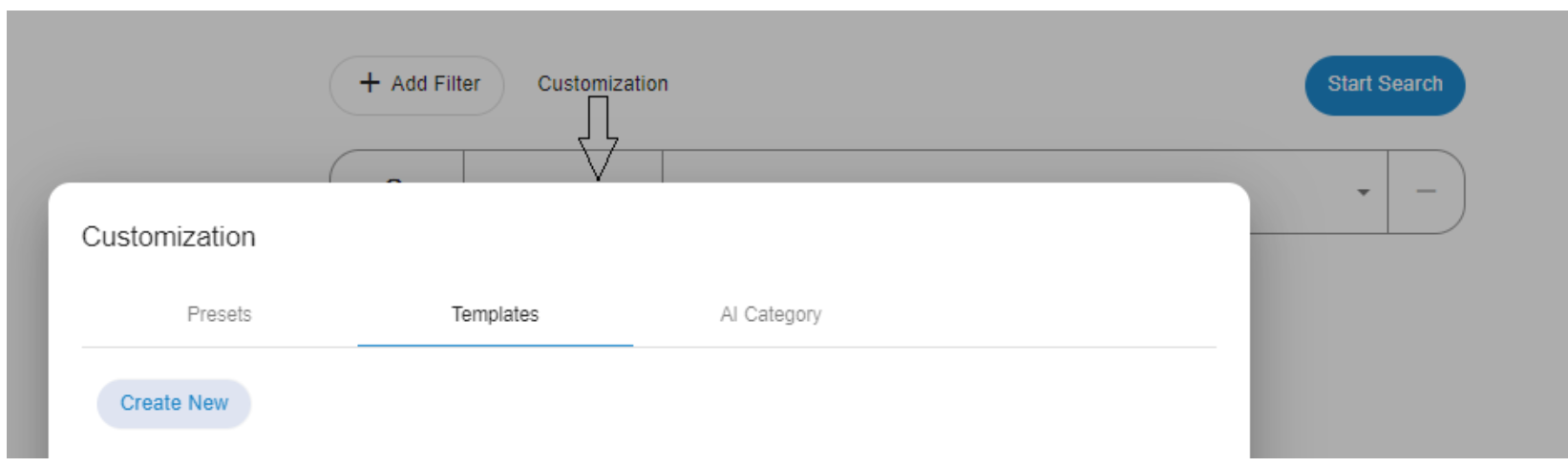
To create a custom template:
- Click Customization in the main JCM Search window.
- Open the Templates tab.
- Click Create New.
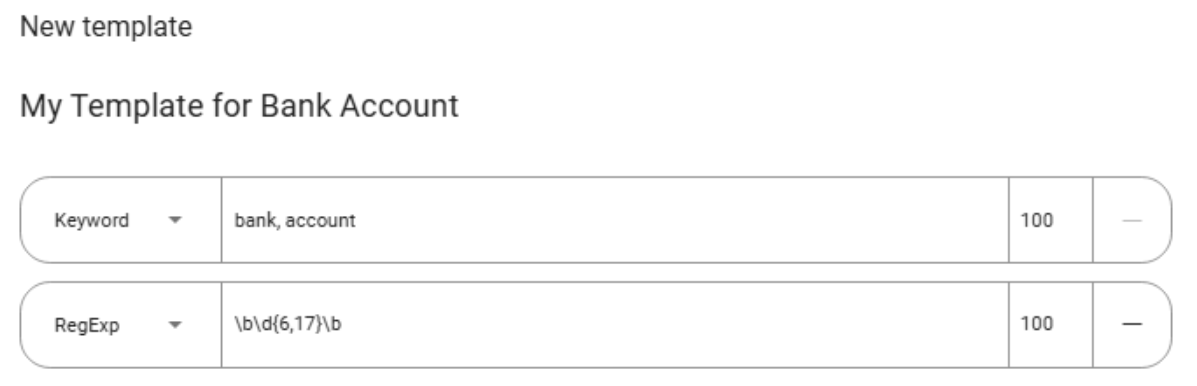
- Provide a template name.
- Add low-level filters (Keyword, Dictionary, Regular Expression) to define the logic.
- Save the template — it becomes immediately available for future searches.
Custom templates are ideal for internal identifiers, proprietary formats, or specialized audit requirements.
Further reading
Templates provide a powerful foundation for detecting structured information across diverse file formats. Once you are familiar with how templates work, you can proceed to the next advanced search mechanisms: Presets and AI Categories, which build on templates to offer broader, smarter, and more flexible data discovery capabilities.