Presets - combined data categories
Presets in JCM Search represent combined data categories built from multiple Templates.
They allow Administrators to search for broader classes of sensitive information without selecting each individual Template manually.
Presets are especially useful when performing discovery tasks related to compliance, audits, and data governance, where the goal is to locate all information of a certain category rather than a specific data element.
How Presets Work
Each Preset consists of a predefined set of Templates grouped under a single logical category.
When a Preset is selected, Search applies all associated Templates together as part of the search query.
This approach allows you to:
- cover multiple types of related sensitive data at once
- reduce configuration effort
- ensure consistency across repeated search operations
Presets build directly on Templates and inherit their detection logic.
Relationship Between Templates and Presets
Presets are built on top of Templates.
Templates define individual data patterns, while Presets group multiple Templates into a higher-level data category.
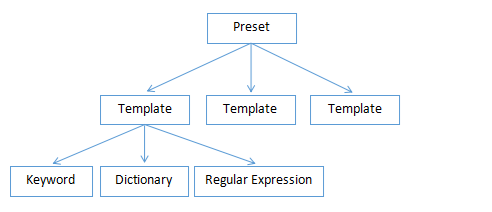
This layered approach allows JCM Search to scale from very precise detection to broad data discovery tasks.
Built-in Presets
JCM includes several predefined Presets designed to cover common regulatory and security use cases.
Each Preset groups Templates relevant to a particular data category.
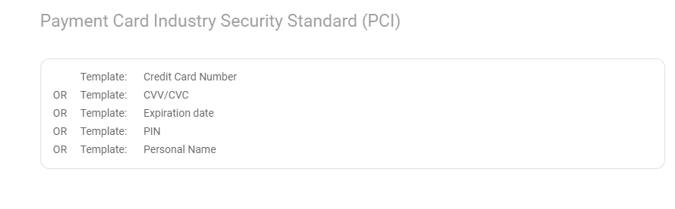
- Payment Card Industry Security Standard (PCI)
Searches for data related to payment card information, including credit card numbers and related authentication elements, as defined by PCI DSS requirements.
Includes Templates such as:
Credit Card Number, CVV/CVC, Expiration Date, PIN, Personal Name
- Personal Identifiable Information (PII)
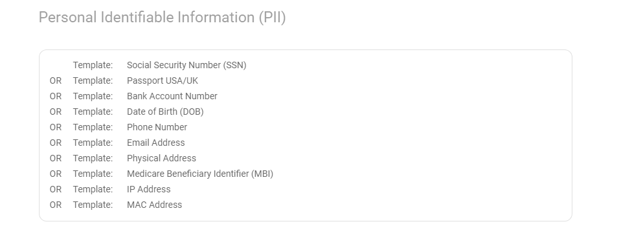
Searches for information that can be used to identify an individual, either directly or indirectly.
Includes Templates such as:
Personal Name, Date of Birth, Social Security Number, Passport, Physical Address, Phone Number, Email Address.
- General Data Protection Regulation (GDPR)
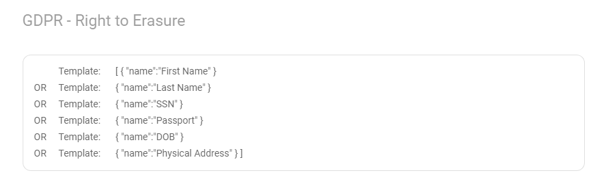
Searches for personal data covered by GDPR, aligning with typical data discovery tasks such as identifying personal information subject to access, deletion, or audit requirements.
Includes Templates related to:
Personal identifiers and other data commonly considered personal data under GDPR.
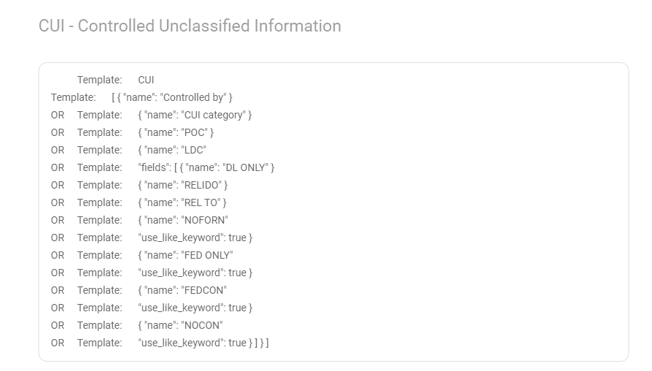
- Controlled Unclassified Information (CUI)
Searches for information categorized as Controlled Unclassified Information, which requires special handling under U.S. regulations despite not being classified.
Includes Templates relevant to:
Identifiers and records commonly associated with controlled government-related information (see the reference below).
Creating Custom Templates
If the built-in Presets do not fully match your requirements, you can create your own.
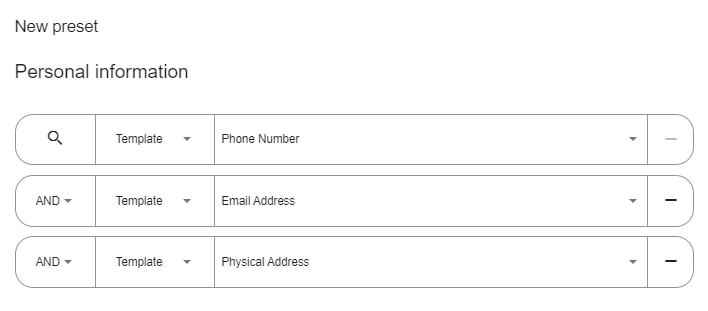
To create a custom Preset:
- Click Customization in the main JCM Search window.
- Open the Presets tab.
- Click Create New.
- Assign a name for the Preset.
- Add one or more existing Templates to define the data category.
- Save the Preset.
Custom Presets allow organizations to tailor search logic to internal policies, industry requirements, or specific audit scenarios.
Further reading
Presets simplify large-scale data discovery by grouping related Templates into meaningful categories. Once you are familiar with Presets, you can continue to the next advanced mechanism: AI Categories, which extend discovery even further by identifying information based on learned content patterns rather than predefined rules.