How Search works
NOTE: The Search feature operates across several core components of Jetico Central Manager (JCM), including the Web Console, the Server and the Client modules. If you would like to review these components or their terminology before reading further, see Jetico Central Manager Architecture and Terminology.
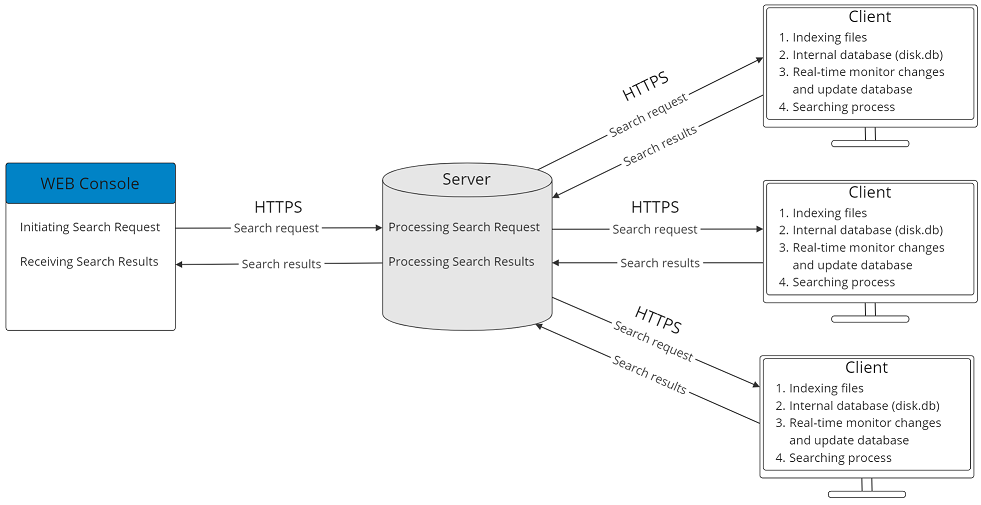
Search tasks in JCM are carried out through coordinated actions between the Web Console, the JCM Server and the JCM Client. This interaction is illustrated in the diagram below. The sections that follow describe each component’s role in more detail.
JCM Web Console: configuring the search
From the JCM Web Console, the Administrator configures the search by selecting:
- Where to search – individual computers or groups
- What to search for – using filters such as file attributes, keywords, Templates, Presets or AI Categories. See What information can be found for more detail.
When the Administrator clicks Start Search, the Web Console sends the search request to the JCM Server over HTTPS.
JCM Server: distributing and collecting results
Once the request is received, the JCM Server:
- Processes the search configuration
- Distributes search tasks to the selected client computers
- Collects search results returned by those clients
- Stores results and search history in its encrypted database
These results and the stored history are made available through the JCM Web Console, where Administrators can:
- Review past search queries
- Re-run previous searches
- Generate reports
- Export results in JSON or CSV format for use with third-party tools
For more details, see the Search Results chapter.
JCM Client: local indexing and search execution
Each client computer performs the actual search using a Resident module designed for efficient local processing.
The Resident module:
- Indexes files in the background extracting text from supported formats such as TXT, PDF, DOC, XLS, ZIP and even from the images of scanned or photographed documents
- Stores extracted text in an encrypted local database (disk.db)
- Monitors file changes in real time, updating the index when files are created, modified or removed
- Responds quickly to search queries by matching against the local index instead of scanning all files again
This approach enables fast search performance even on endpoints with large datasets.
NOTE: Before using the Search functionality, make sure the Search module has been activated and installed on the client computers you want to include in your searches. For instructions, see How to Activate JCM Search in JCM.