Protection Policies
Protection policies are the main configuration objects used by BestCrypt Data Shelter to control access to protected data on client computers.
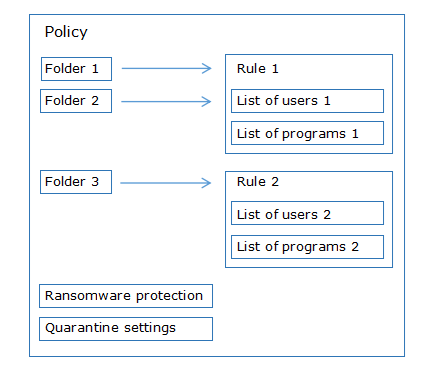
A protection policy combines:
- protected folders,
- protection rules,
- and additional policy-wide protection settings such as ransomware protection and quarantine behavior.
Policies are managed centrally through Jetico Central Manager and can be applied to individual computers or groups of computers.
The following figure shows the structure of a Data Shelter protection policy:
Protected Folders
Protected folders define which data should be protected by BestCrypt Data Shelter.
When a folder is added to a policy, Data Shelter monitors and controls access to the files stored in that folder according to the assigned protection rule.
A single policy can contain multiple protected folders.
Protection Rules
Protection rules define which users and applications are allowed to access protected data.
Rules consist of:
- allowed users,
- allowed programs,
- and optional additional restrictions.
Each protected folder in a policy is associated with a protection rule.
Detailed information about configuring rules is available in the Protection Rules
Policy-wide Protection Settings
In addition to folder protection rules, a protection policy can include settings that affect the overall behavior of the policy. These settings apply to the policy as a whole, not to a single protected folder or rule.
Policy-wide settings include:
- ransomware protection options;
- quarantine options.
Ransomware protection
Ransomware protection helps detect suspicious encryption activity, such as attempts to encrypt disk volumes or files in protected folders. This behavior is commonly associated with crypto-malware and ransomware.
Administrators can configure whether Data Shelter should:
- block detected disk volume encryption attempts by suspending or canceling the operation;
- report detected disk volume encryption attempts to JCM.
Quarantine
Quarantine helps prevent changed executable files from accessing protected data until they are reviewed.
Data Shelter keeps a history of programs that access protected folders, including a hash, or secure checksum, of each executable file. If an executable changes, its hash changes as well.
A changed executable may be legitimate, for example after a software update. It may also indicate that the program was modified, replaced, or infected.
Administrators can configure whether Data Shelter should:
- use quarantine for changed executable files that try to access protected folders;
- exclude trusted signed applications or Windows Resource Protection Service components from quarantine handling.
For information about reviewing and removing quarantined programs, see Managing Quarantined Programs.
Client Policy Terminology
When working with BestCrypt Data Shelter on a client computer, you may see the term policy used differently than in JCM.
In JCM, a protection policy is a Global Policy that contains protected folders, protection rules, and policy-wide settings.
In the BestCrypt Data Shelter client, a policy usually refers to the access settings for a protected folder. In JCM, those settings are closest to a protection rule.
This difference is most important when importing a configuration from a client computer into JCM. For details, see Importing a Policy from a Client Computer.
Next Step
Now that you understand the structure of protection policies, continue with the Creating a Protection Policy article to learn how to configure and deploy policies in Jetico Central Manager.