BestCrypt Volume Encryption can store encryption keys for volumes on removable devices like SafeNet eToken, Yubikey and USB disk removable devices.
When the user inserts such a removable device, BestCrypt Volume Encryption enables the option Use removable device to store encryption key in the dialog window appeared when you encrypt volume. If you choose the option, you will have to enter passphrase for the device you have inserted. The following picture shows the dialog window.
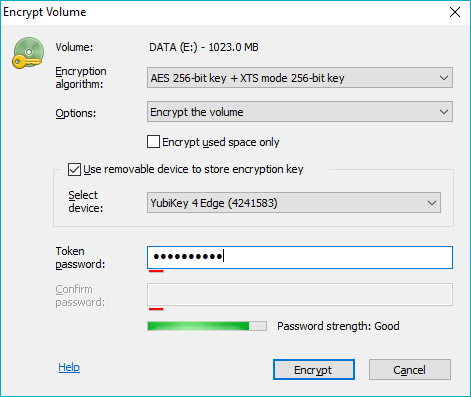
To use the device, check the Use removable device to store encryption key checkbox. Then enter passphrase for the hardware device to the Token password edit box.
For devices that have a pre-set password BCVE will ask to enter the pre-set Token password once (to authenticate into the device).
BCVE doesn't allow to share YubiKey between different PC. Thus, if the inserted Yubikey was initialized on another computer, BCVE will inform the user that the Yubikey should be re-initialized on this computer by running the ->Encryption key->Delete all keys from external storage command.
If the user is going to encrypt a System/Boot volume, the software will need to test whether the removable device can be accessed at boot time, or not. The software will suggest the user should reboot the computer with the device inserted and then run the Encrypt volume command again. If the boot test passed successfully, it will be permitted to store the key for the Boot/System volume on the device.
If the encryption key for a volume is stored on removable device, accessing said encrypted volume will require the device connected to USB port and the entry of an appropriate passphrase. Encrypted data cannot be accessed without both of these Two Factors: knowing passphrase for the device and with the removable device attached.
BestCrypt Volume Encryption also allows the user to backup encryption keys from one removable device to another and, if needed, completely delete encryption keys from removable devices. Read more detail about the functions in Managing Keys on Hardware Token article.
A removable storage device with an encryption key for the volume is only required for mounting the volume. After that, the device can be removed from the USB port and the computer can be used normally with mounted volume’s data remaining accessable. By managing removable key storage devices in this way, it minimizes the exposure of the fact that they are in use as two factor authentication devices. It also minimizes risk of losing the devices or unwittingly leaving them behind at a workstation.