BestCrypt Volume Encryption supports encrypting System and Boot volumes.
If a boot or system volume is encrypted and physical damage to the volume occurs, it will be impossible to boot the computer. BestCrypt Volume Encryption suggests the user should create Rescue Bootable CD or Rescue Bootable USB drive. The disk contains a Rescue File and special recovering program that starts just after booting the computer from the disk.
To save rescue data, run the ->Save Rescue Data command. If a system or boot volumes is not encrypted on the computer, the program will suggest the user should save rescue file to some safe location, for example, to a removable disk or remote server.
If system or boot volume is encrypted, after running the Save Rescue Data command, the following dialog window will appear.
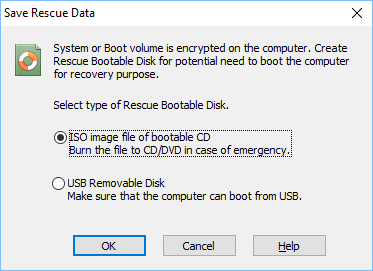
Select the first option in the dialog window to create a Rescue Bootable CD or DVD disk. The program creates file with ISO image of the Bootable CD/DVD with the Rescue File. Then you should create a bootable CD using the ISO file. (Read more about ISO image files on http://en.wikipedia.org/wiki/ISO_image).
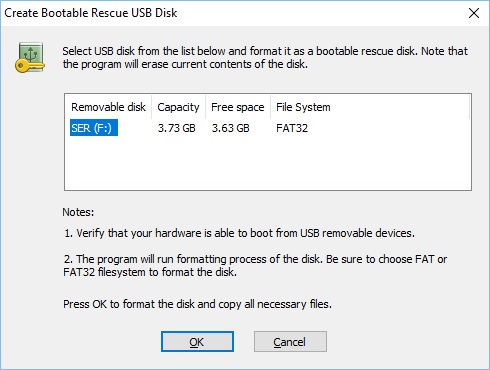
Select the second option to create Rescue Bootable USB removable disk. BestCrypt Volume Encryption will look for suitable USB removable disks on the computer and display them.
NOTE: Rescue information on the bootable disk is securely encrypted and requires authentication with your password to be used. This also applies when Two-Factor Authentication with USB/Yubikey/eToken is configured, which means that it is possible to run rescue decryption without the device, but in that case the rescue disk itself is the second factor. Thus it should be kept in a safe place elsewhere.
NOTE: This functionality requires that your hardware is able to boot from USB removable devices. This can be done by setting USB as the first device in the BIOS Boot Order or directly selecting the USB drive from the system’s Boot Options. For UEFI computers, the Secure Boot option must be disabled in UEFI BIOS.
If accidental damage of the system or boot volume occurs and you cannot boot computer, do the following to recover the volume:
For systems using an MBR boot platform, the utility will display information about encrypted volumes and ask for the password:
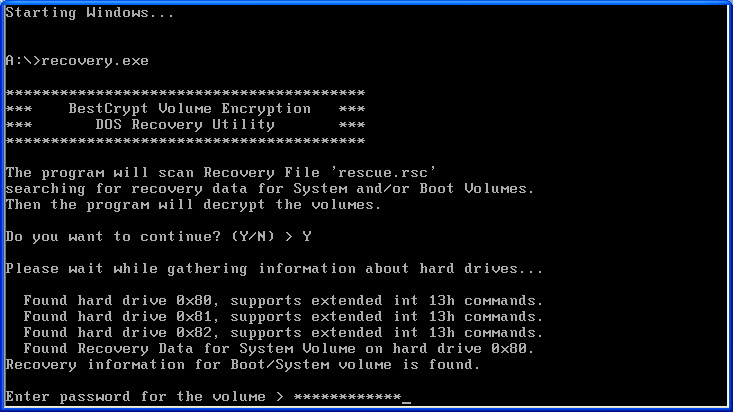
The decryption process will start after accepting the password and your confirmation. When the process of recovery decryption finishes, remove the Rescue Bootable Disk and reboot the computer so that the normal boot process will run.
BestCrypt Volume Encryption program protects its UEFI boot loaders carefully. However, it might happen that Windows Update or third-party utilities replace or remove the loader. If that is the case, a boot-time prompt for the required password will not appear when computer is powered on and, instead, Windows will load directly into its Automatic Repair program.
Thus, for systems used UEFI boot platform, the recovering utility features algorithms to restore BCVE UEFI boot loader without decrypting volumes. After you boot such system from a Rescue Bootable Disk, the utility will ask if you want to check consistency of the boot loader:
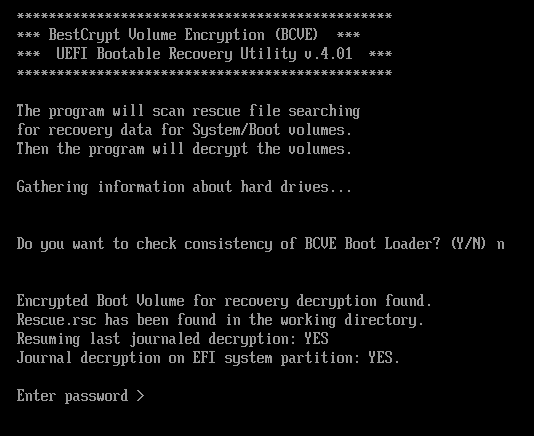
If you select 'Y', it will try to restore BCVE boot loader, if you select 'N', the system will ask for the password and ask if you want to start rescue decryption process.
NOTE: If you do not have the Rescue USB, please click here to download the UEFI loader restoration utility manually. To use the utility unzip the archive and read the readme file for further instructions. Please note that the USB should be formatted with FAT32.