Main Window
User interface of BestCrypt Volume Encryption program is designed close
to traditional interface of Windows Disk Management Console in
Computer Management program. It helps the user easily understand
a whole idea of using the program and provides a graphic representation of
volumes' location on physical disks in easy form.
The user interface of BestCrypt Volume Encryption program is designed closely to mirror the traditional interface of the Windows Disk Management Console
in the Computer Management program. It makes the program as user-friendly as possible by providing a clear graphical representation of volumes' locations on physical disks.
When you run BestCrypt Volume Encryption program, the following window
appears.
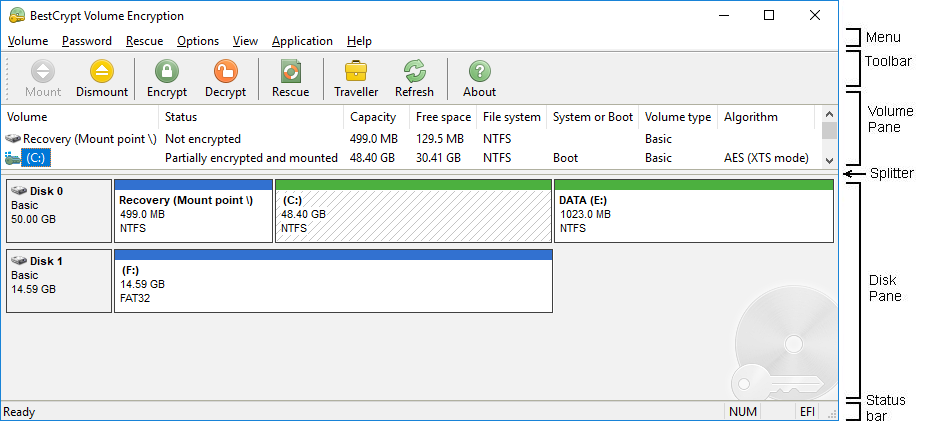
The main window of the BestCrypt Volume Encryption program consists of the
following parts:
- Menu containing all the commands that allow the user
to run main functions of the software.
- Toolbar buttons allow
the user to run frequently used functions by a single mouse click.
- Volume pane which contains a list of volumes
the software can encrypt.
- Disk pane shows graphic representation of every volume location on
physical disk(s).
-
Splitter. It allows the user to share space in main window between Volume pane and Disk pane.
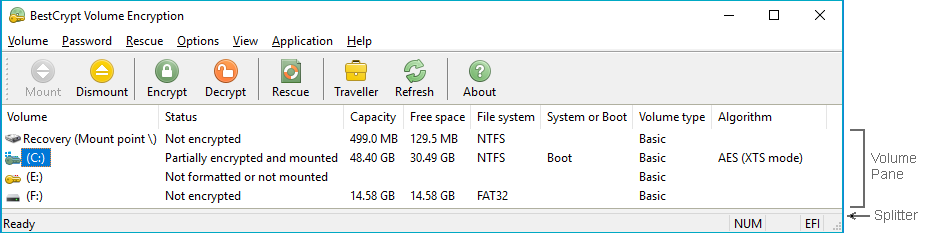
For example, a user can move the splitter to the bottom of the main window so that Disk pane will not be visible at all.
In every day work users probably do not need to observe locations of volumes on physical drives because commands to mount/dismount volumes are
possible to run with only the Volume pane visible. As such, the option to remove the Disk pane from the main window allows the user to minimize space needed
for the Volume Encryption window. This can simplify the program window and free up usable monitor space. The following picture illustrates the example:
-
Status bar shows the status of currently running commands. Additionally, status bar displays a short description of the commands the user selects in the menu.